
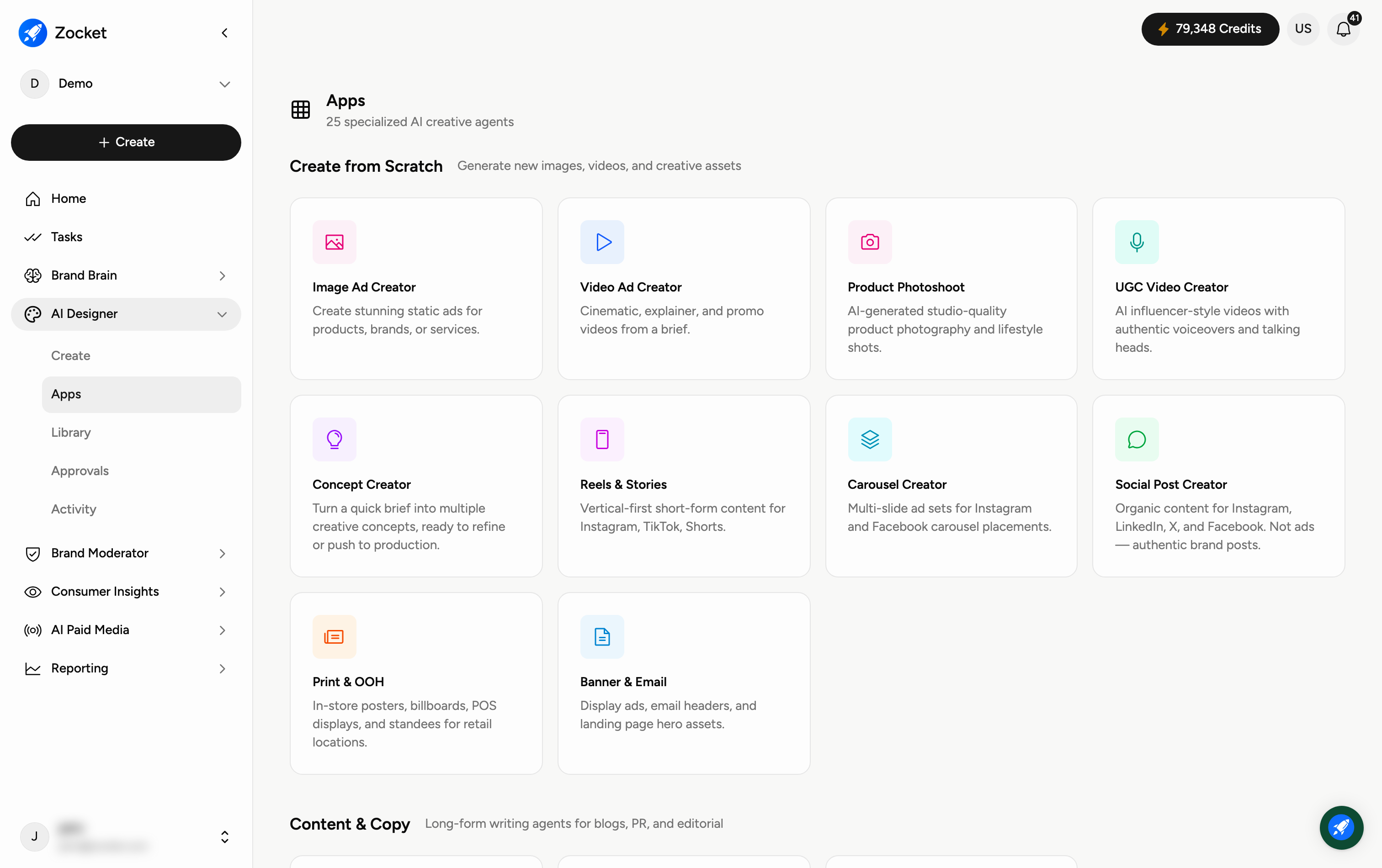
Apps is your library of specialised AI creative agents — each one purpose-built for a specific job, from making an image ad to adapting a creative for a new platform. Open it from AI Designer → Apps. This guide shows how to browse and launch them; each app also has its own detailed how-to.
Why you'd use it
A library of specialised AI creative agents, each tuned for one job. Instead of one generic image generator, you pick the specialist: an Image Ad Creator for statics, a UGC Video Creator for influencer-style videos, a Localization Studio for regional adaptation, a Compliance Checker for brand-rule audits. Specialists beat generalists, each app knows what good looks like for its format.
Step 1 — Browse the app library
The apps are grouped into four purpose-based sections so you can find the right tool fast:
Create from Scratch — generate new assets: Image Ad Creator, Video Ad Creator, Product Photoshoot, UGC Video Creator, Concept Creator, Reels & Stories, Carousel Creator, Social Post Creator, Print & OOH, Banner & Email.
Content & Copy — long-form writing: Blog / PR Creator, Content Discovery, Content Planner.
Transform & Adapt — resize, localise, and optimise existing creatives: Image Resizer, Image Rescaler, Variant Generator, Platform Adapter, Localization Studio, Background Studio, Compliance Checker.
Competitive & Commerce — counter competitors and win on marketplaces: A+ Marketplace, Amazon Brand Store, Above-the-Fold Creator, Competitive Cloner, Seasonal Campaign.
Step 2 — Launch an app
Every app is a card showing an icon, its name, and a short line describing what it does. Click a card to open that agent and start creating — it guides you from there. You'll also find the most-used ones under Featured Tools on the Create hub.
When to come here
When you know the format you need and want the specialist for it. When localizing a master creative across regions. When you need marketplace content (Amazon/Flipkart). When you want to answer a competitor's campaign with your own on-brand version.
Frequently Asked Questions
How do I pick the right app?
Start from what you want to do. Making something new? Look in Create from Scratch. Reworking an existing creative? Transform & Adapt. Writing? Content & Copy. Competing on a marketplace? Competitive & Commerce.
What's the difference between Apps and the Create hub?
The Create hub is the quick start (describe what you want, or pick image, video, or UGC). Apps is the full library of specialised agents for more specific jobs.
Do all apps produce on-brand results?
Yes — every app draws on your Brand DNA, so outputs match your colours, tone, and style by default.
Is there a guide for each individual app?
Yes — each app has its own how-to covering exactly how to use it. This guide is the map to all of them.
Do apps use credits?
Yes — generating creatives spends credits, and heavier jobs (like video) use more. Track your balance under Settings → Credits Usage.