
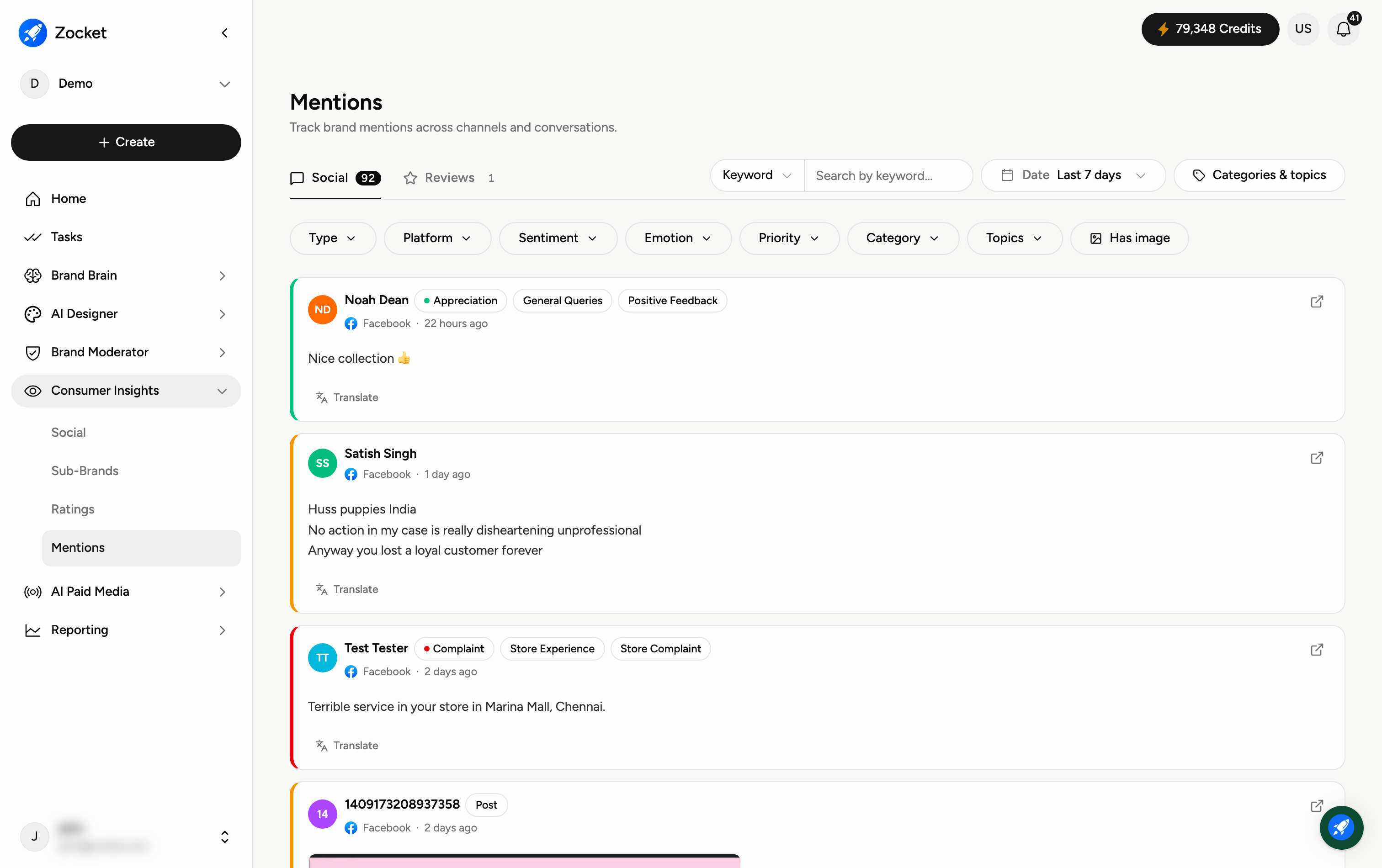
Mentions tracks every brand mention across channels and conversations — the raw feed of who's saying what, which powers the numbers you see in Social Intelligence. Open it from Consumer Insights → Mentions.
Why you'd use it
Gives you the underlying evidence. Social Intelligence tells you sentiment moved; Mentions is where you read the actual posts that moved it. It's a listening feed, distinct from the Brand Moderator queue: Mentions is for reading and understanding, the Review Queue is for replying.
Step 1 — Pick Social or Reviews
Two tabs split the feed by where the mention came from, each showing how many items match your current filters:
Social — posts, comments and threads on social platforms.
Reviews — reviews from app stores, marketplaces and retail listings.
Step 2 — Search, then narrow
Along the top sit Keyword search with a field selector, a Date range (it defaults to the last 7 days), and Categories & topics.
Below that is the filter row. All of these stack:
Type — the kind of mention, for example a post, comment or review.
Platform — where it came from.
Sentiment — positive, neutral or negative.
Emotion — how the person feels, for example complaint, disappointment or appreciation.
Priority — how urgently it needs attention, so the feed can be read as a work queue.
Category — the subject, for example Return & Replacement or Store Experience.
Topics — finer-grained themes, once configured for your workspace.
Has image — only mentions that came with a picture.
Step 3 — Read the feed
Every mention shows who posted it, its emotion or intent, its category tags, the platform and how long ago it landed, then the message itself. Images posted with a mention appear inline, and there is a link out to the original.
Each mention also has a Translate action, so a comment in a language you don't read can be understood without leaving the page.
When you reach the bottom you'll see End of mentions for the current filter. If the feed is empty, the date range is the usual cause — widen it and clear the keyword.
When to come here
Investigating a sentiment dip or a topic spike. Pulling verbatims for a research readout. Filtering to negative plus high priority to see what actually needs working through today. Checking coverage on a platform where you have no presence.
Frequently Asked Questions
How is this different from Social Intelligence?
Social Intelligence gives you the summarised numbers (reach, sentiment, share of voice). Mentions is the underlying list of individual mentions those numbers are built from.
Why is the feed empty?
Usually the Date filter, which defaults to the last 7 days. Widen it, clear the keyword, and check you haven't left a filter applied from an earlier session.
Which tab should I use?
Social for what people are saying on social platforms, Reviews for app-store, marketplace and retail reviews. If you care about the subject rather than the channel, stay on either tab and use Categories & topics.
What is the Priority filter for?
It ranks mentions by how urgently they need a response, so you can treat the feed as a work queue rather than a firehose. Combining Priority with negative Sentiment is the quickest way to find what matters today.
Can I read mentions written in another language?
Yes — use the Translate action on the mention.
Can I search for a specific topic or person?
Yes — type it in the Keyword box and use the field selector to choose what is searched, then combine with the filters to focus on a channel, sentiment or category.
Where do these mentions come from?
From the sources connected to your workspace plus public data on the platforms you track. You do not need to own the account a mention appears on, which is how coverage works on channels where your brand has no official presence.
How is this different from the Brand Moderator Review Queue?
Mentions is for reading and understanding what is being said. The Review Queue in Brand Moderator is where replies are drafted, approved and sent.
What's the difference between the Social and Reviews tabs?
Social covers posts and conversations about you across social platforms and the web. Reviews covers places people leave a rating alongside their comment. They are separate tabs because they behave differently — social is a conversation you may want to join, a review is a published verdict that stays where it is.