
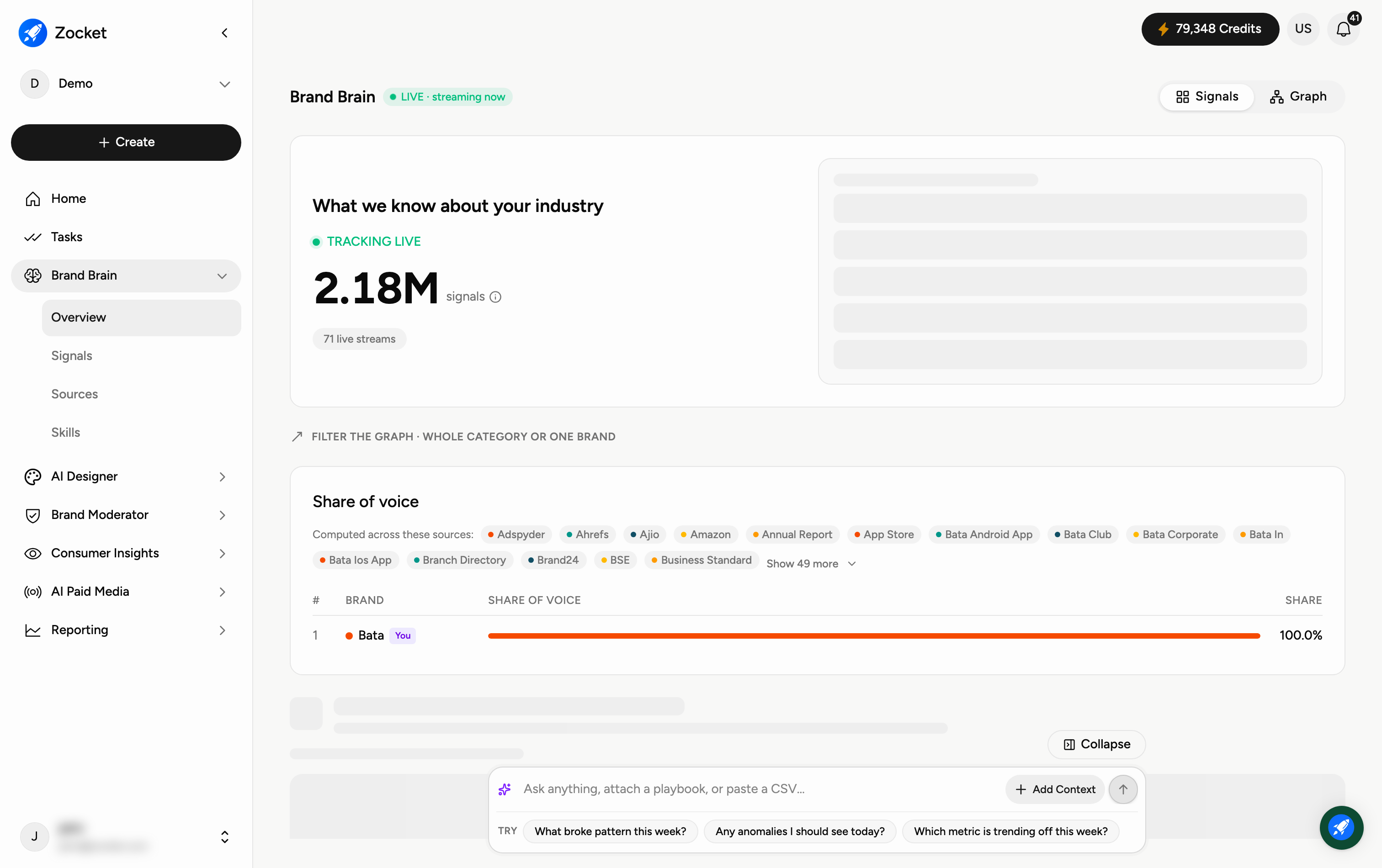
Brand Brain continuously tracks what's being said about your brand and your whole category across the web, and turns it into signals you can explore. The Overview is your starting point — open it from Brand Brain → Overview in the sidebar.
Why you'd use it
The knowledge graph every Zocket agent runs on, made visible. Brand Brain crawls your site and existing creative, then continuously ingests signals about your brand and competitors in your category into a structured graph. Instead of the knowledge graph being an invisible setup step, this screen shows exactly what Zocket knows, from which sources, and how fresh it is.
Step 1 — Choose how to view it
Top-right, the Signals / Graph toggle switches how you view everything Brand Brain has gathered: Signals is the readable list of findings; Graph shows the same intelligence as a visual map of how brands, topics, and sources connect, and can be filtered to the whole category or a single brand.
Step 2 — Read your Share of Voice
The Share of Voice section ranks your brand against competitors by how much of the category's conversation each one owns. It's computed across many sources (shown as chips — click Show more to see them all), so it reflects the whole market, not a single channel. Your own brand is marked You.
Step 3 — Check which sources are feeding it
Below the ranking, a Sources roll-up shows how many sources are connected, how many signals they have produced in total, and how many are live right now. Each source is listed with its own signal count and its freshness — a source that has stopped updating is marked Stale along with when it last synced. Stale sources are the usual reason a number looks wrong: the data simply stopped arriving.
Step 4 — Ask Brand Brain a question
At the bottom is a chat box — "Ask anything, attach a playbook, or paste a CSV…". Type a plain-English question about your brand or category (for example, "What broke pattern this week?" or "Any anomalies I should see today?") and Brand Brain answers using everything it's tracking. Use the suggested prompts underneath to get started.
When to come here
During onboarding, to confirm the graph is built and streaming. When a stakeholder asks "what does Zocket actually know about us?". When a source goes stale and you need to see it before an agent produces something off.
Frequently Asked Questions
What exactly is a "signal"?
A signal is a single relevant finding Brand Brain has picked up — a mention, a price change, a competitor move, a news item, and so on. The big number is the total it has gathered for your category.
What's the difference between the Signals and Graph views?
Signals lists the findings so you can read them; Graph visualises how brands, topics, and sources relate to each other. Use the toggle at the top-right to switch.
How is Share of Voice calculated?
It's your brand's portion of the total category conversation, combined across all the listed sources — so a higher share means your brand is being talked about more than competitors.
Is the data live?
Some of it. The Sources roll-up tells you exactly which sources are live and which are Stale, with the last sync time for each. If a figure looks out of date, check there first.
What can I ask it?
Anything about your brand or category in plain English — trends, anomalies, competitor moves, or "what changed this week". You can also attach a playbook or paste a CSV for it to work from.
Where do the findings come from?
From the sources listed under Share of Voice and in the Sources roll-up — review sites, maps and listings, marketplaces, social platforms, filings, news and more. See the Sources guide for how to connect and manage them.
What does "Stale" mean on a source?
It has stopped syncing, and the time shown is its last successful sync. Reconnect it so its data keeps feeding your signals.