
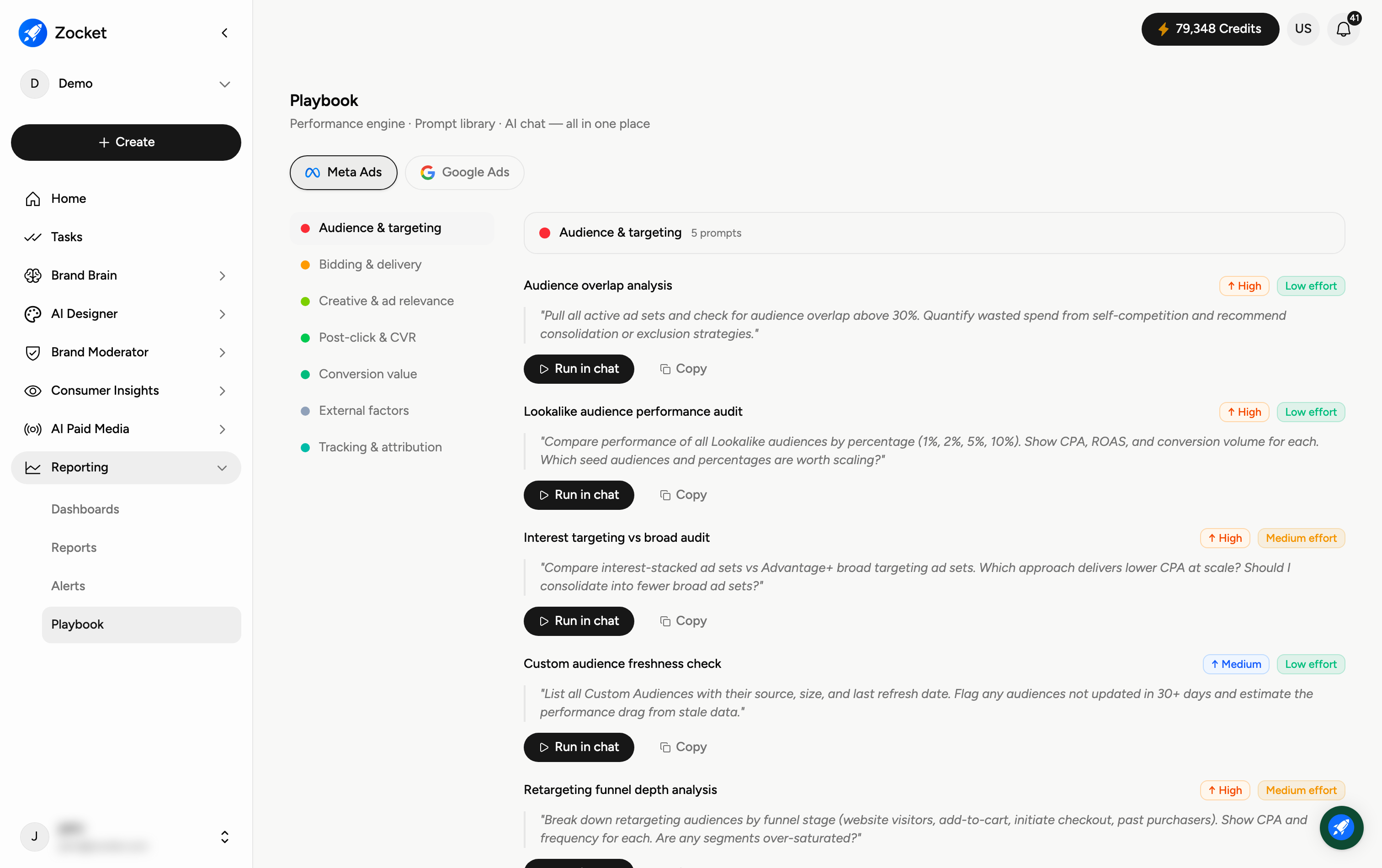
The Playbook is Zocket's performance engine — a prompt library plus AI chat, all in one place. It's a curated set of expert, ready-to-run prompts for analysing and optimising your paid media. Open it from Reporting → Playbook. It recently moved here from AI Paid Media as part of the new Reporting section.
Why you'd use it
The performance engine, prompt library, and AI chat in one place. Instead of guessing what to ask, you pick from prompts that senior performance marketers actually run, hit "Run in chat," and the analysis runs against your live data. Playbook now sits under Reporting, not inside AI Paid Media, it moved when Reporting became its own top-level section.
Step 1 — Pick a platform and category
Switch between Meta Ads and Google Ads at the top, then choose a category from the list to find the right prompts: Audience & targeting, Bidding & delivery, Creative & ad relevance, Post-click & CVR, Conversion value, External factors, and Tracking & attribution.
Step 2 — Run a prompt
Each prompt is a card showing its title, a priority tag (High or Medium), an effort tag (Low or Medium), and the exact prompt text. Click Run in chat to execute it against your own account data, or Copy to reuse and tweak it.
When to come here
Weekly performance review. Onboarding a new performance marketer. When you suspect a specific issue (saturation, waste, attribution) and want the canonical diagnostic.
Frequently Asked Questions
What is the Playbook for?
It saves you from writing analysis prompts from scratch — expert-designed prompts for common paid-media questions (wasted spend, lookalike performance, funnel depth, attribution) that you can run in one click.
What do the priority and effort tags mean?
Priority is how impactful the analysis usually is; effort is how much work acting on it typically takes. Start with high-priority, low-effort prompts for quick wins.
What happens when I click "Run in chat"?
It runs the prompt in the AI chat against your connected account data and returns the analysis — so you need your ad accounts connected (see the Connectors guide).
Can I edit a prompt?
Yes — click Copy, paste it into the chat, and adjust it (thresholds, date ranges, platforms) before running.
Where did the Playbook go?
It moved from AI Paid Media into the new Reporting section, alongside Dashboards, Reports, and Alerts. Same prompt library, new home.