
Welcome to Zocket. This short guide shows you how to find your way around the dashboard so you can start creating.
Why you'd use it
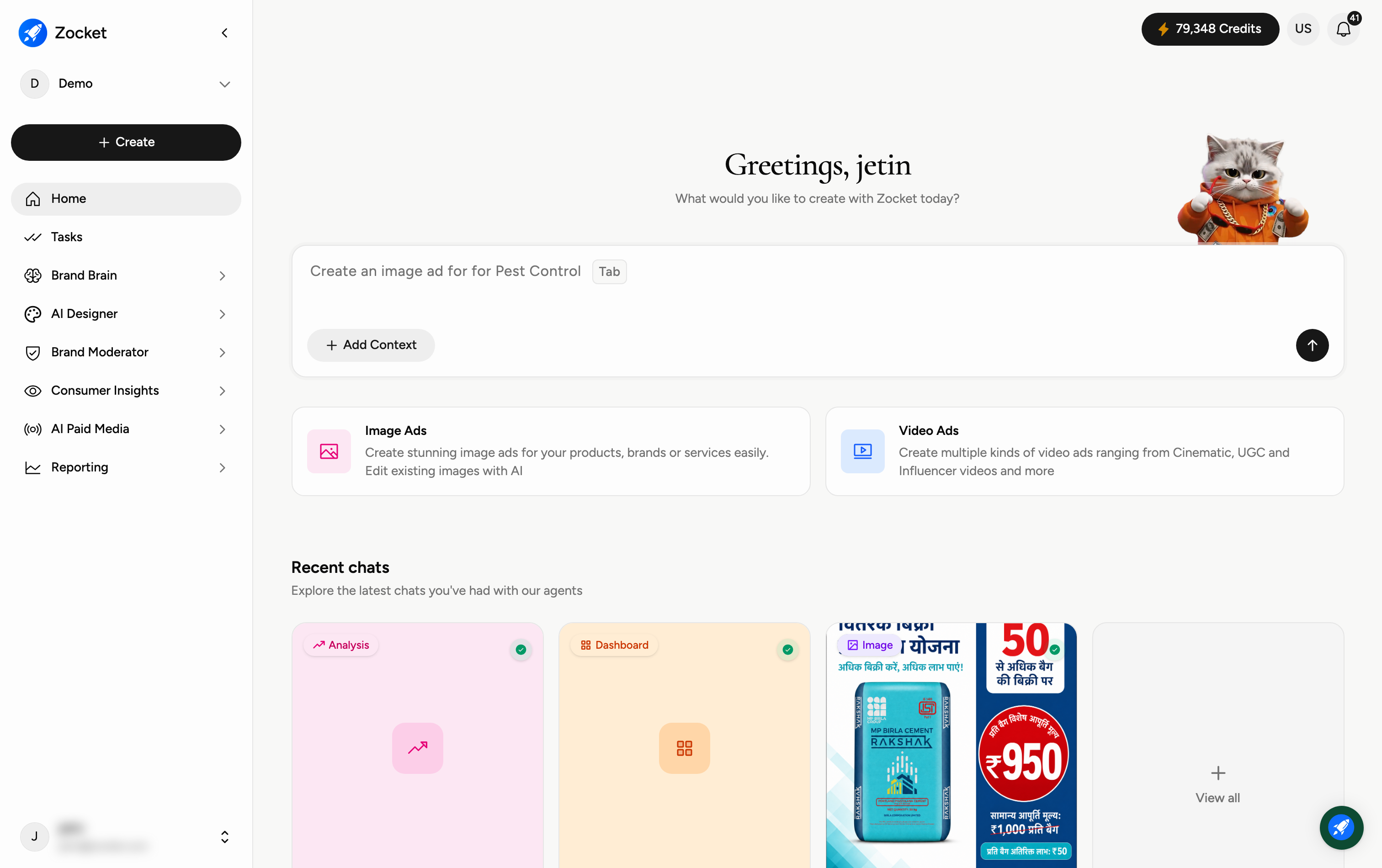
The first screen after login. One prompt box, "What would you like to create with Zocket today?", routes whatever you type to the right AI agent. You don't need to know which module does what: type it, attach context if you have it, and go.
1. Switch between workspaces (top-left)
The dropdown at the top-left of the sidebar shows your current workspace (for example, Demo). Click it to switch to a different brand or workspace you have access to.
2. Create something new
The black Create button is your fastest way to start. Click it to jump straight into making an image ad, a video ad, and more.
3. Move between the main modules (left sidebar)
The left sidebar is your main menu. From here you can open every part of Zocket:
Home — your starting screen and recent chats.
Tasks — work assigned to you and your agents.
Brand Brain — live intelligence about your brand and industry.
AI Designer — generate ads, videos, and creative assets.
Brand Moderator — review and respond to comments and messages.
Consumer Insights — track what people say about your brand.
AI Paid Media — optimise your ad performance.
Reporting — dashboards, reports, alerts, and the prompt playbook.
4. Check your credits and notifications (top-right)
The pill at the top-right shows your remaining credits — the balance you spend when generating creatives. The bell next to it shows your notifications.
When to come here
Every session starts here. Use it when you know what you want ("make a Diwali offer creative for Gold Loan") but don't care which app does it, the router picks the right agent for you.
Frequently Asked Questions
Do I need to install anything to use Zocket?
No. Zocket runs entirely in your web browser at app.zocket.com — just log in. There's nothing to download or install.
What are credits, and when do I use them?
Credits are your usage balance. You spend them each time you generate a creative (an image ad, video, and so on). Your remaining balance is always shown in the pill at the top-right.
Can I work across different brands or clients?
Yes. Use the workspace dropdown at the top-left (for example, "Demo") to switch between any workspaces you have access to. Each workspace keeps its own brand, content, and history separate.
I just want to make an ad — where do I start?
Click the black Create button in the sidebar, or open AI Designer from the left menu. Both take you straight into creating image or video ads.
What do the modules in the sidebar do?
Each is a different part of Zocket: Brand Brain (brand and industry intelligence), AI Designer (creating ads and content), Brand Moderator (replying to comments and messages), Consumer Insights (social listening, ratings and reviews), AI Paid Media (ad performance), and Reporting (dashboards, reports and alerts). This guide series covers each one in detail.
Why do some numbers or panels take a moment to appear?
Several screens (like Brand Brain) stream live data, so figures may load a second or two after the page opens. If a panel looks empty, give it a moment or refresh.