
Video Ad Creator turns a short brief into cinematic, explainer, and promo videos. Open it from AI Designer → Apps → Video Ad Creator. Fill in the brief, and the agent generates your video, which you then refine in chat.
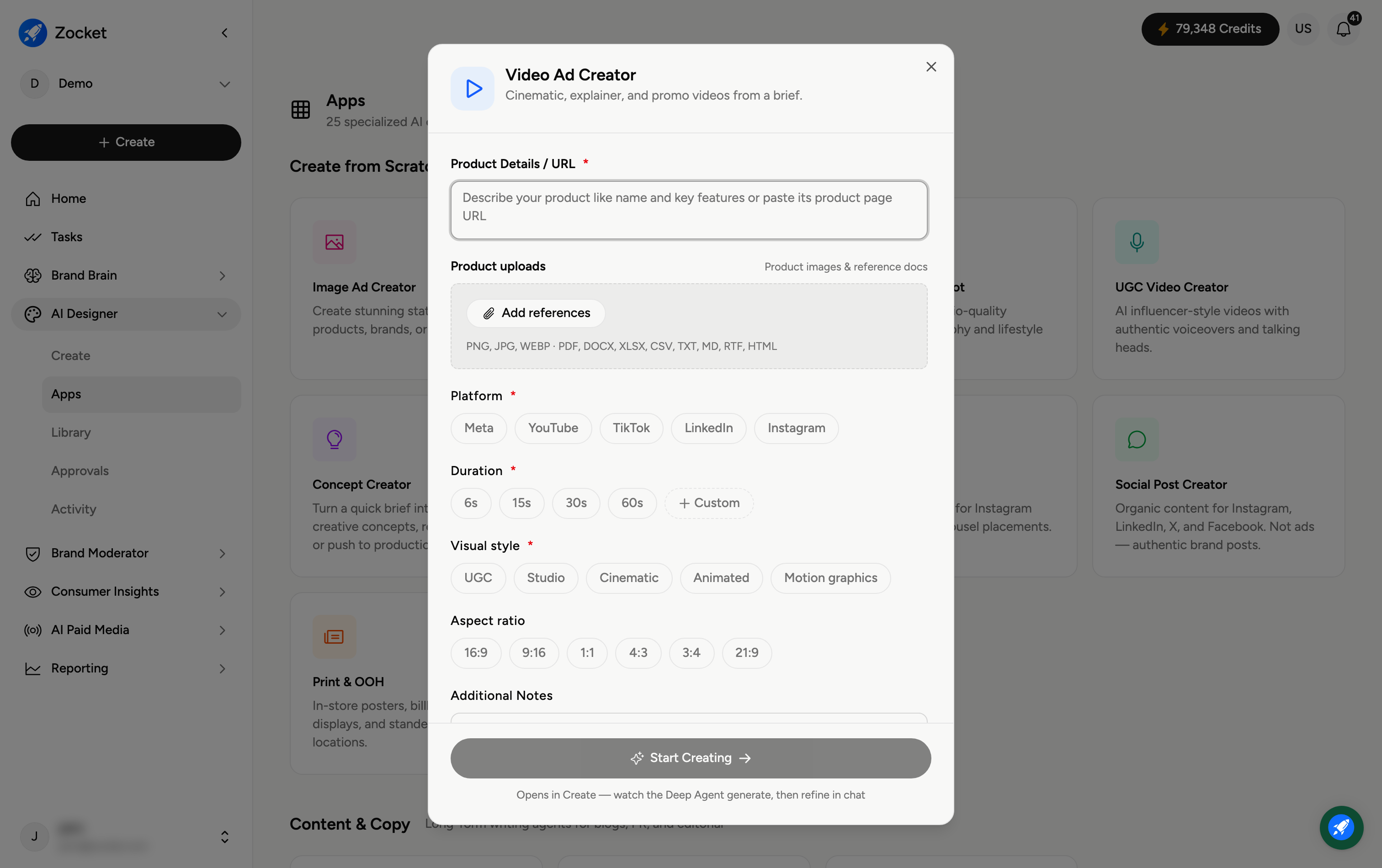
Step 1 — Describe your product
In Product Details / URL (required), describe your product and key features, or paste the product page URL. Use Add references to attach product images or documents for accuracy (PNG, JPG, WEBP, PDF, DOCX, XLSX, CSV, TXT, MD, RTF, HTML).
Step 2 — Set your video options
Platform (required) — Meta, YouTube, TikTok, LinkedIn, or Instagram, so the video fits where it'll run.
Duration (required) — 6s, 15s, 30s, 60s, or Custom.
Visual style (required) — UGC, Studio, Cinematic, Animated, or Motion graphics.
Aspect ratio — 16:9, 9:16, 1:1, 4:3, 3:4, or 21:9.
You can also add Additional Notes for anything specific (a hook, a call-to-action, must-have shots).
Step 3 — Start creating
Click Start Creating. The brief opens in Create, where you watch the agent generate the video and then refine it in chat — ask for a different hook, pacing, or scenes until it's right. The finished video is saved to your Library.
Frequently Asked Questions
Which platform and duration should I pick?
Match them to the placement: short 6 to 15 second vertical (9:16) videos for TikTok, Reels and Stories; longer 30 to 60 second landscape (16:9) for YouTube. The Platform setting tailors format and pacing automatically.
What's the difference between the visual styles?
UGC feels authentic and handheld, Studio is clean and product-focused, Cinematic is high-production, and Animated and Motion graphics are illustrated or graphic rather than filmed.
Do videos cost more credits than images?
Yes — video is a heavier job, so it uses more credits. Longer durations and more scenes cost more.
Can I change the video after it generates?
Yes — refine in chat: request different scenes, text, music feel, or trims until you're happy.
Where does the finished video go?
It's saved to your Library (AI Designer → Library) for reuse or download.