
Carousel Creator generates a full social carousel as one coordinated set — every slide shares the same palette, type treatment, and layout, while each advances a distinct beat of the story. Great for multi-slide Instagram and Facebook carousels. Open it from AI Designer → Apps → Carousel Creator.
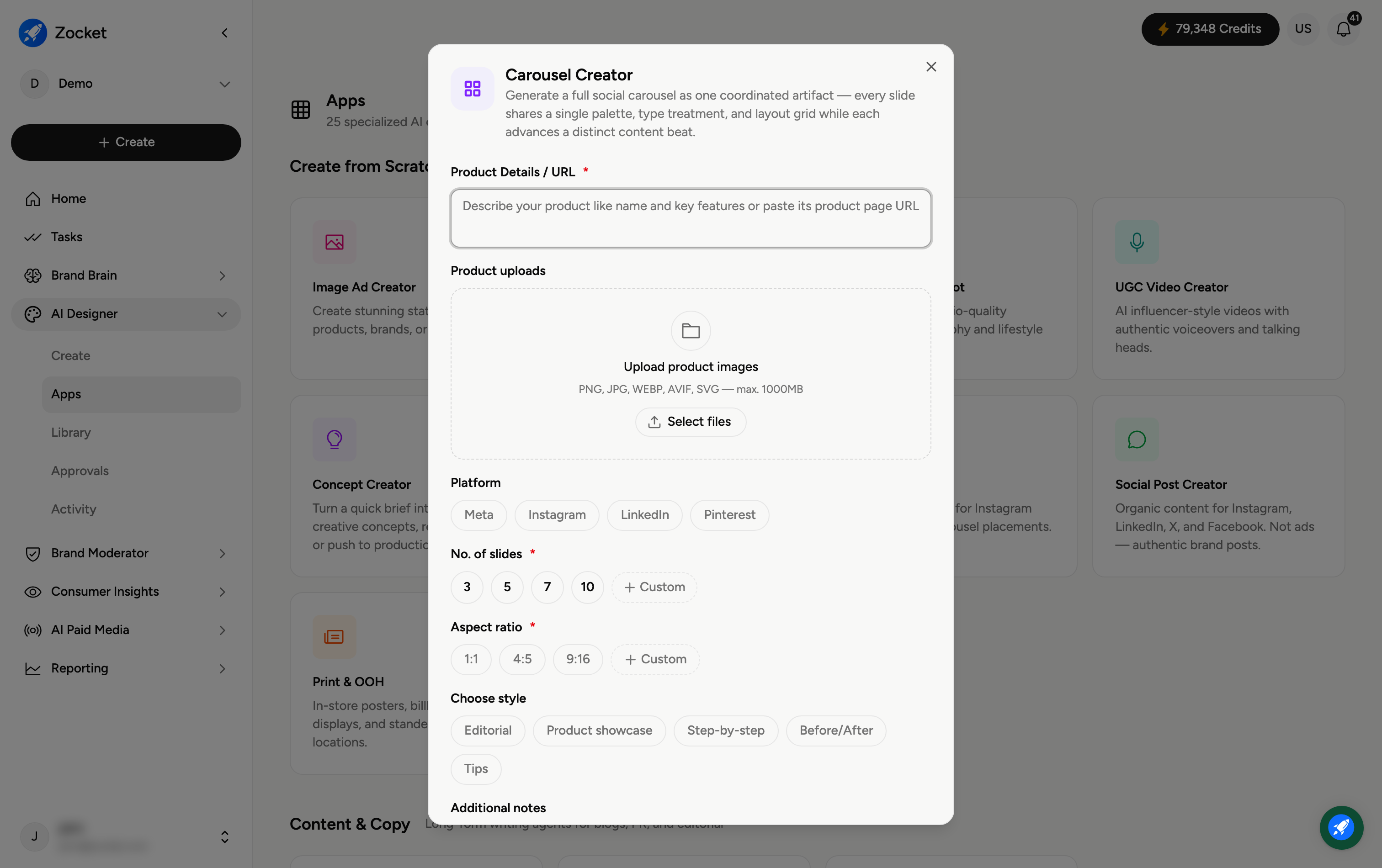
Step 1 — Describe your product and platform
Enter Product Details / URL (required) and, if you like, Upload product images. Then pick the Platform the carousel is for — Meta, Instagram, LinkedIn, or Pinterest.
Step 2 — Set slides and aspect ratio
No. of slides (required) — 3, 5, 7, 10, or Custom.
Aspect ratio (required) — 1:1, 4:5, 9:16, or Custom.
Step 3 — Choose a style and generate
Scroll to Choose style and pick the narrative shape — Editorial, Product showcase, Step-by-step, or Before/After — then generate. It opens in Create, where you refine in chat and reorder or re-word individual slides. The finished carousel is saved to your Library.
Frequently Asked Questions
Will the slides look consistent?
Yes — that's the point. The whole carousel is generated as one coordinated set, so palette, fonts, and layout stay consistent across every slide.
How many slides should I use?
Match it to the story: 3 for a quick point, 5 to 7 for a typical narrative, up to 10 for step-by-step or detailed showcases.
Which aspect ratio for Instagram?
4:5 gives the tallest feed footprint; 1:1 is the classic square. Use 9:16 only for full-screen vertical placements.
What do the styles mean?
Editorial is magazine-like, Product showcase highlights the product across slides, Step-by-step walks through a process, and Before/After shows a transformation.
Where does the carousel go?
To your Library (AI Designer → Library) for reuse or download.