
Sources are the data feeds that power Brand Brain — the more you connect, the richer and more accurate your signals become. This page shows what's feeding your Brand Brain, and what's left to connect. Open it from Brand Brain → Sources.
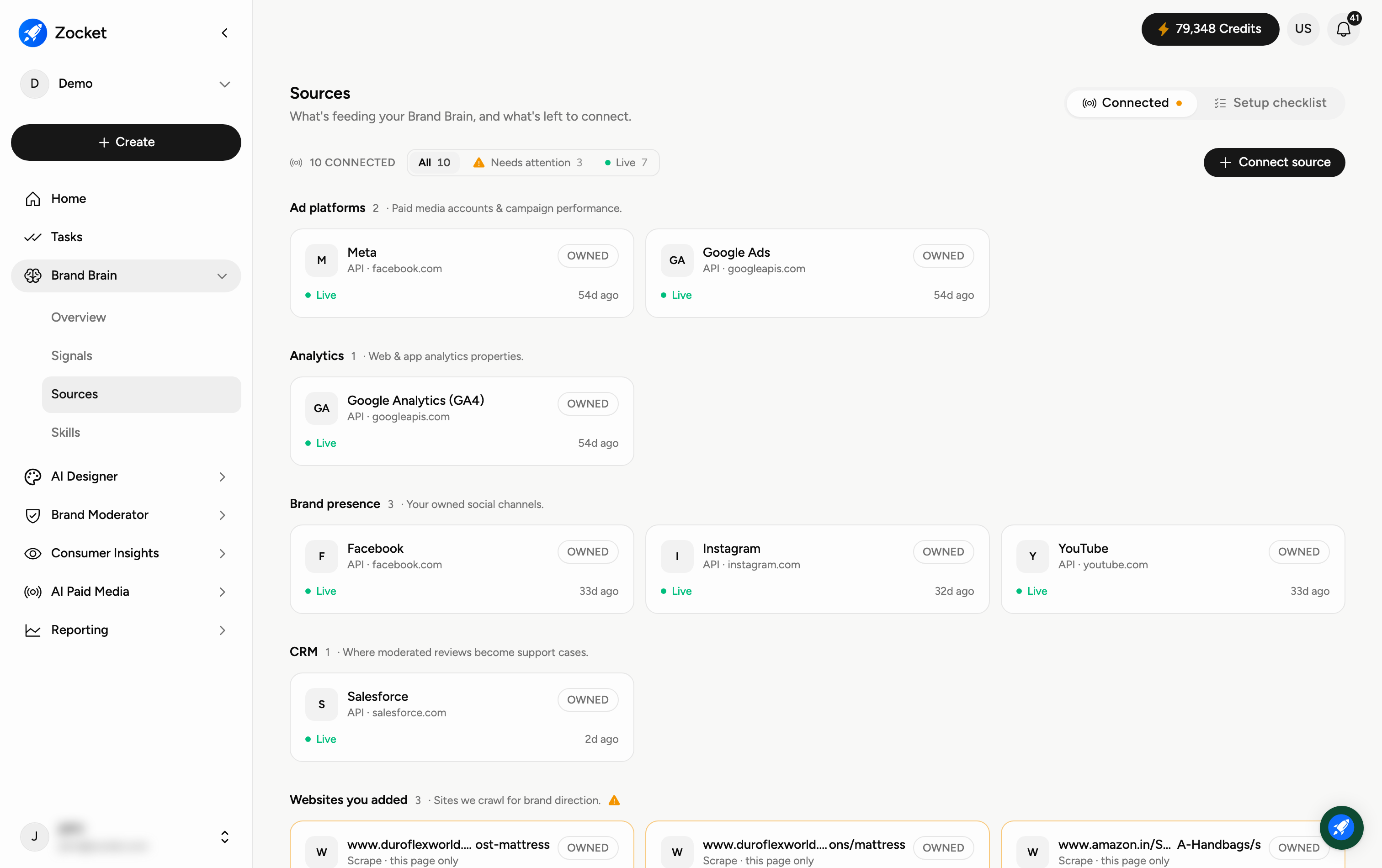
Step 1 — See what's connected and add more
The count at the top tells you how many feeds are connected. Use the controls to manage them:
Connected — the feeds already wired up (the default view).
Setup checklist — what's recommended but not yet connected, so you know what to add next.
Connect source — add a new feed.
Next to the count, three chips let you jump straight to what matters: All, Needs attention, and Live. Start with Needs attention — that is where anything broken shows up.
Step 2 — Read a source card
Sources are grouped by what they are:
Ad platforms — paid media accounts and campaign performance.
Analytics — web and app analytics properties.
Brand presence — your owned social channels.
Websites you added — sites we crawl for brand direction.
Each card shows the source name, how it connects (API · domain for a connected account, or Scrape with the crawl scope for a website), whether it's OWNED by you, its status, and when it last synced. A green Live means data is flowing normally; Needs attention means something is wrong, and the card explains what.
Frequently Asked Questions
Why should I connect more sources?
Every source adds more of the picture. More feeds mean more complete signals and a more accurate Share of Voice in the Overview.
What does "OWNED" mean?
It marks a source that belongs to your own accounts (like your Google Ads), as opposed to public sources Brand Brain reads on its own.
How do I add a new source?
Click Connect source and follow the prompts. Check the Setup checklist tab first to see which recommended sources you're still missing.
What if a source isn't "Live"?
A source marked Needs attention has a problem — an expired connection, or a page that isn't returning what we expected. The card says what's wrong. Filter by Needs attention to see them all at once.
What's the difference between an API source and a scraped website?
An API source is an account you've connected and authorised, so it syncs directly. A Scrape source is a web page we read on a schedule, and the card shows how much of the site is covered — a single page, or more. Pointing it at the wrong kind of page (a search results page, say) is a common cause of "Needs attention".
What does the "last synced" time refer to?
That's when the source last pulled new data. Live sources refresh regularly, so a recent time means the data is current.
Can I set up a brand using only competitors, without adding my own website?
Yes. Competitors alone are now enough to build a brand — you no longer need an owned domain first. Add the competitors you want tracked and Brand Brain builds from those.
How do I say which competitor I mean?
When you add a competitor you can name the specific rival, so the brand you get back is scoped to the company you actually compete with rather than one with a similar name.
Can I remove a source I added by mistake?
Yes. Sources can be removed. The website step is also split into two sections — owned domains and competitor links — so it is clear which of the two you are editing.
What are the three steps when I connect a website?
Authenticate, then Scope, then Activate. Authenticate is where the work is: you give the URL or sitemap, and you separate owned domains — your main site, microsites, regional and landing-page domains, one of them marked Primary — from Competitor links, which are tracked for market signals and are explicitly not treated as owned content. Scope and Activate follow. Take care over what you put in the owned block: a source pointed at the wrong page is the most common cause of a "Needs attention" badge later.