
Team Management is where you control who's in your workspace and what they can do across Zocket's AI modules. You invite teammates, assign a workspace role, and set fine-grained access per module — for example, someone can be an Approver in Creative AI but only an Analyst in Performance AI. Find it under Settings → Users.
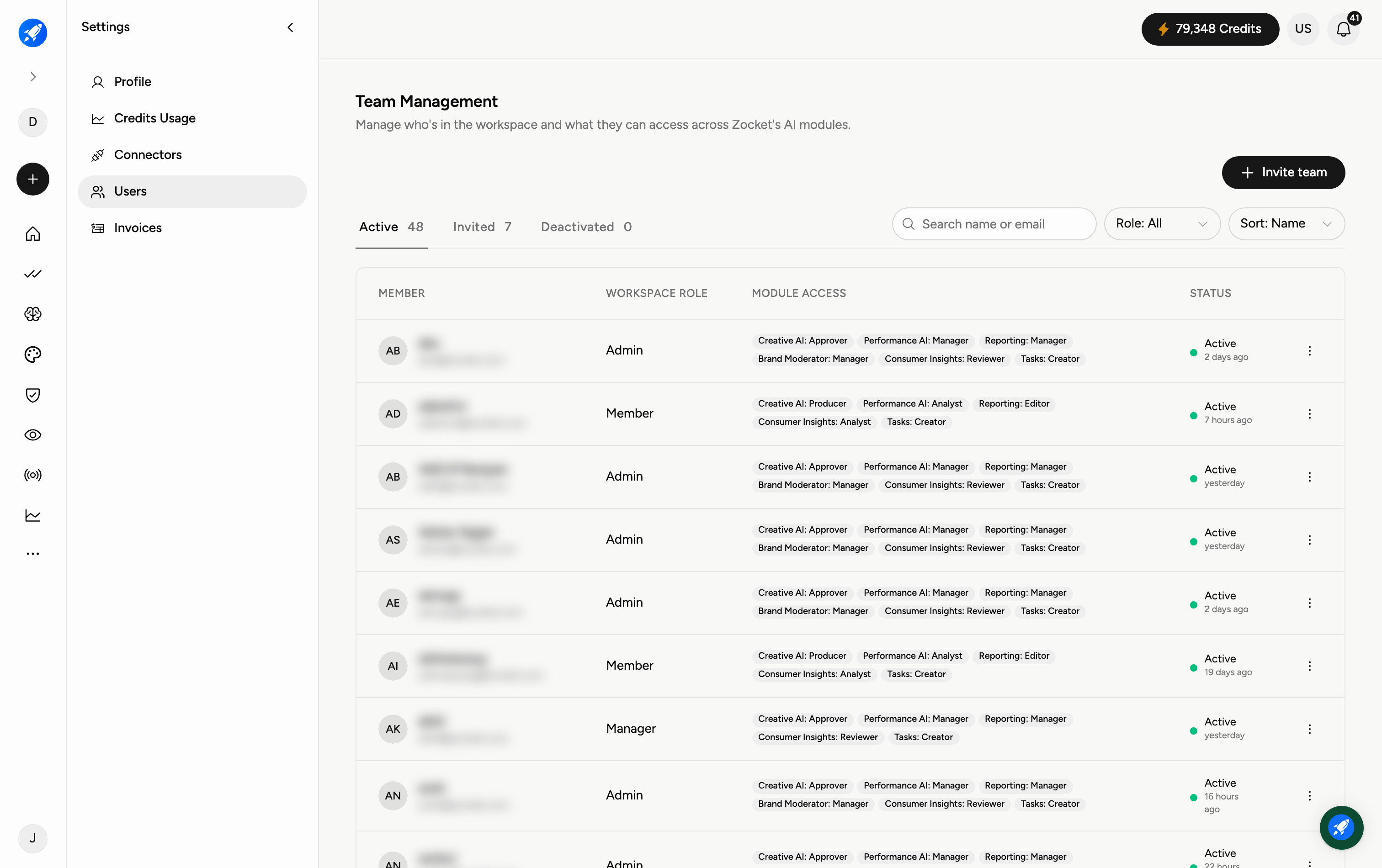
Step 1 — Open Settings → Users
Go to Settings and choose Users. The top of the page shows counts of Active, Invited, and Deactivated members so you can see your team at a glance.
Step 2 — Invite a teammate
Click Invite team and enter the person's email. They'll appear under Invited until they accept, then move to Active.
Step 3 — Understand roles
Each member has a workspace role — typically Owner, Admin, Manager, or Member — shown in the WORKSPACE ROLE column. This sets their overall level of control in the workspace.
Step 4 — Set module access
The MODULE ACCESS column shows each person's permission within each product area — for example Creative AI: Approver, Performance AI: Manager, Brand Moderator: Manager, Consumer Insights: Reviewer, Tasks: Creator. Adjust these to give people exactly the access they need, no more.
Step 5 — Find and organise members
Use Search members by name or email, the Role filter, and the Sort control to navigate a large team. The STATUS column shows whether each member is Active and when they were last seen.
Frequently Asked Questions
How do I add someone to the workspace?
Settings → Users → Invite team, then enter their email. They show as Invited until they accept.
What's the difference between a workspace role and module access?
The workspace role (Owner, Admin, Manager, Member) sets overall control; module access sets what they can do inside each specific module.
Can someone have different permissions in different modules?
Yes — that's the point of module access. A person can be an Approver in Creative AI and only a Reviewer in Consumer Insights.
What does Deactivated mean?
The member no longer has access but their record is kept. This is the safe alternative to fully removing someone.
How do I find one person on a large team?
Use the search box, or filter by Role and sort the list.
Who can manage the team?
Typically Owners and Admins. If you can't see the controls, ask a workspace Owner or Admin to adjust your role.