
Brand Moderator pulls everything said about your brand into one queue with an AI-drafted reply already attached. This page covers what lands there and how to cut it down to the part you care about.
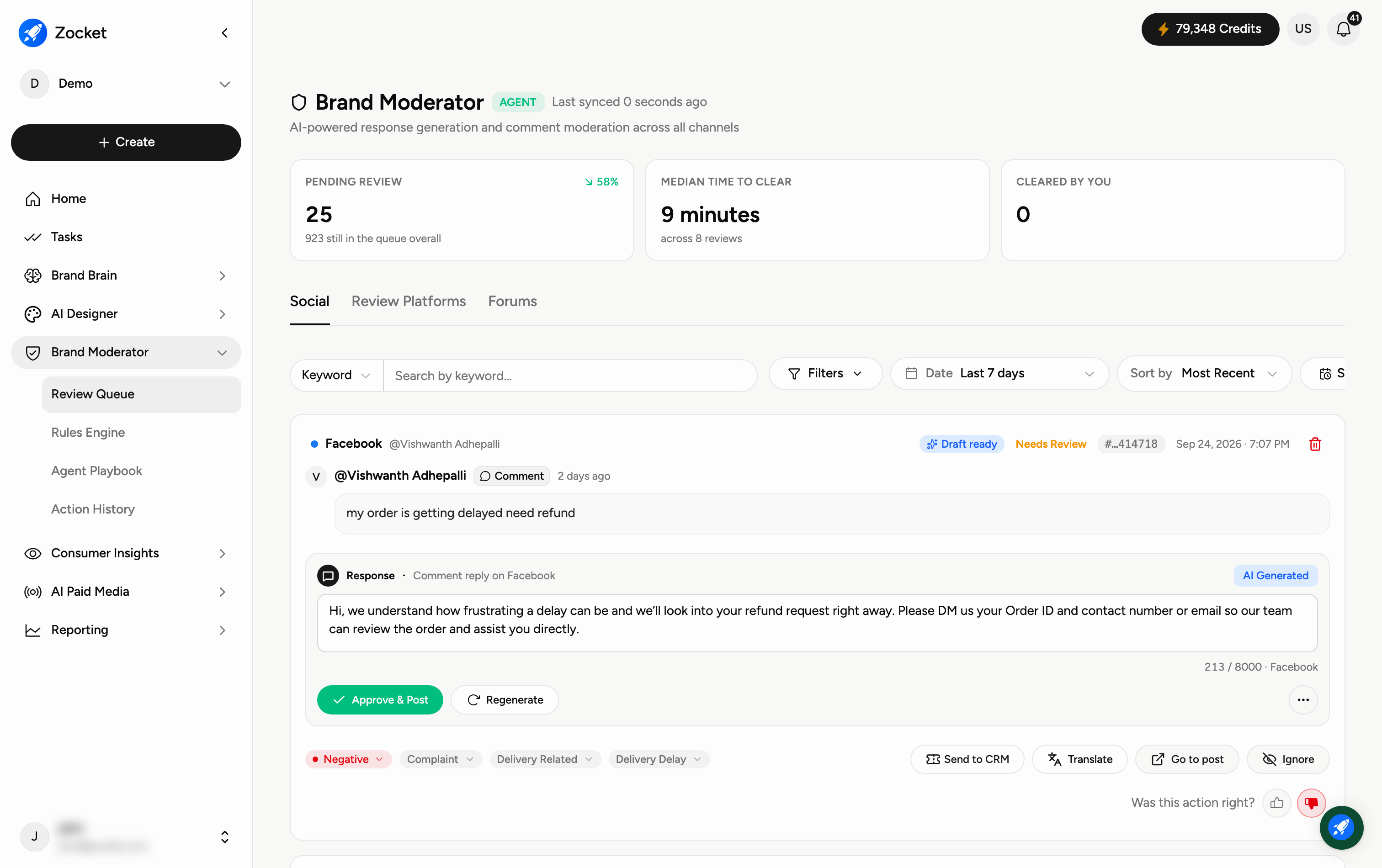
Why you'd use it
A brand with several connected accounts can see hundreds of items a day. The queue is only useful if you can reduce it to the handful that need a human — an angry comment, a pricing question, a complaint heading for escalation.
The three channel groups
Social
Review Platforms
Forums
These are tabs across the top of the queue. Social carries comments and DMs from your connected accounts; Review Platforms carries store and marketplace reviews; Forums carries threaded discussion.
Filtering the queue
Open Filters for:
Status
Socials
Sentiment
Category
Message Type
Alongside those you have a Date range, a Keyword search, Sort by, and a Scheduled view.
A practical combination: Sentiment negative, Date last 7 days, sorted most recent. That is the list worth a person's attention on a Monday morning.
What the queue does not separate today
Paid and organic are not distinguished. Comments left on a paid ad arrive in the same queue as comments on an organic post, and there is no filter that isolates one from the other. If you need to report on ad-comment sentiment specifically, raise it with your Zocket contact rather than assuming a filter exists.
Two related limits worth knowing before you set expectations internally:
A generic or common brand name will pull in unrelated mentions. Keyword search narrows the queue, but the ingest itself is broad.
Country-level segmentation depends on what each platform exposes, and several restrict it — so coverage varies by channel rather than being uniform.
Good to know
Every item arrives with a reply already drafted; you approve, edit or ignore.
The header shows how many are pending, the median time to clear, and how many you have cleared yourself.